
Recify - Keeper & Organizer
MIRO CONSULTING SRLFood & Drink
4.583.00 Reviews
- Version
- 1.6.11
- Installs
- 10.00K
- Age Rating
- Everyone
Screenshots


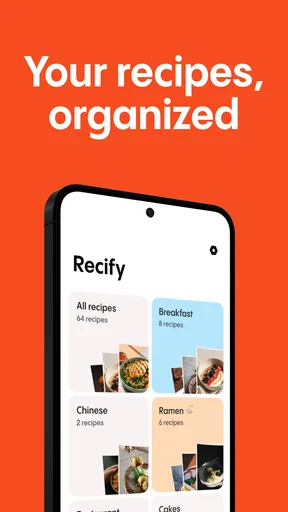
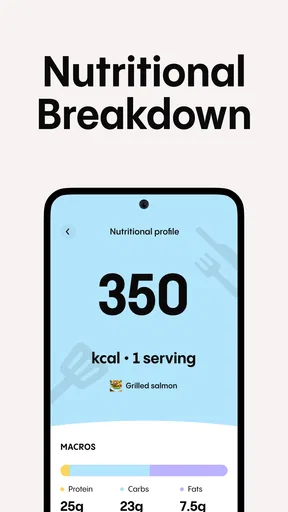




Our Review of Recify - Keeper & Organizer
 Analysis by Appyee
When I decide whether a recipe app is worth keeping, I care less about how many tools it advertises and more about whether it can turn a saved idea into dinner without making me do extra admin. A useful organizer should help me retrieve a recipe later, keep my collection understandable, and make planning feel lighter rather than like another chore. That is the lens I’d use for Recify - Keeper & Organizer: it brings saved recipes and meal planning together, which is most valuable when your ideas currently live in several different places.
Start with the problem you want to solve
If your recipes are split between browser bookmarks, social posts, screenshots, and handwritten notes, the main question is whether you want one home for them or simply a better way to browse. Recify is aimed at the first problem. It is a free food and drink app from MIRO CONSULTING SRL, with optional in-app purchases priced from $3.49 to $39.99 per item. Its audience rating is 4.5 from around 1,900 ratings, and it has passed 10,000 installs. Those figures suggest it has found an audience, but the practical test is whether its collecting and organizing approach suits your habits.
I would especially consider it if I regularly save recipes while scrolling and then forget where I put them. It is less compelling if I already have a tidy collection in a notebook or a general-purpose notes app and rarely need help planning meals. Changing systems takes effort: recipes must be brought over, categories need to make sense, and a new routine has to stick. I would start by saving a small group of recipes I actually cook, rather than trying to migrate every food idea I have ever collected.
Discovering the Magic of Recify
Let’s dive right into what makes Recify - Keeper & Organizer a game-changer. At first glance, the app has a clean, intuitive interface that feels like a breath of fresh air. No more cluttered screens or complicated menus. You open it, and boom, you're greeted with simplicity. This is perfect for someone who just wants to get organized without a huge learning curve.
Features That Make Life Easier
So, what can you do with Recify? For starters, it’s got this nifty feature where you can snap a photo of a recipe, and it’ll automatically scan and save it. That’s right, all those magazine cutouts can now live digitally in one place! Plus, if you’re browsing online and spot something that tickles your taste buds, just copy and paste the URL, and Recify will pull the recipe details for you.
Another feature I adore is the tagging system. You can tag recipes by meal type, cuisine, or even by ingredients. So, when you’re in the mood for some Italian, a quick search will bring up all your pasta delights. It’s like having a personal assistant who knows your kitchen inside out.
Organize Your Way
Now, I know what you’re thinking: "But I have my own way of organizing!" Don’t worry, Recify lets you customize folders and categories so you can stick to your system or try something new. It’s flexible enough to accommodate even the most particular of organizers.
A realistic weeknight test
Here is where I’d judge the planning tools in everyday use. Imagine it is late afternoon, I have a few saved dinner ideas, and I need to decide what to cook before heading to the shop. I’d put likely meals into the week’s plan, then use the associated shopping list as a prompt while checking what is already in the cupboard. That last check matters: a generated list can reduce forgotten ingredients, but it cannot know what I have at home unless I account for it myself.
A small habit makes this workflow more useful: tag a recipe when saving it, not weeks later when the collection has grown. A tag such as “quick dinner” or “use up vegetables” can be more useful in the moment than a broad cuisine label. I would also keep categories simple at first. Too many folders create a second organizational project; a handful of labels that match how I actually choose meals is easier to maintain.
When another kind of tool is better
Compared with browser bookmarks, a recipe organizer is better suited to bringing food ideas together and finding them through cooking-related labels. Bookmarks may still be the better choice if I mostly want to save whole webpages and do not need meal planning. A general notes app can be more flexible for handwritten substitutions, family stories, or cooking notes, but it usually asks me to create and maintain that structure myself. Recify’s appeal is the combination of collection and planning, not a promise that it replaces every kitchen tool.
There is also a practical distinction between collecting and cooking. A link or scanned page is a starting point, not proof that every recipe will import cleanly or be easy to follow. I would open newly saved recipes and check that the key instructions and ingredients are usable before relying on them for a timed meal. For a recipe that is important to me, I’d keep a brief note about changes I made, rather than assuming the saved version will remember how I adapted it.
Organizing Your Way
Now, I know what you’re thinking: "But I have my own way of organizing!" Don’t worry, Recify lets you customize folders and categories so you can stick to your system or try something new. It’s flexible enough to accommodate even the most particular of organizers.
And let’s not forget the meal planning feature. You can schedule meals for the week and create shopping lists based on your plans. It’s like having your favorite recipes hold your hand through the grocery store, ensuring you never forget that crucial ingredient again.
Sharing is Caring
One of the things I love most is the sharing capability. Found a recipe that’s too good not to share? You can easily send it to friends or family directly from the app. No more copying and pasting or sending endless messages. Plus, it’s a great way to swap recipes with fellow food lovers.
Passing recipes between people
Sharing is most useful when it solves a specific kitchen problem: I can send a recipe to someone who is cooking the same meal, or pass along a dish that has become a family favorite. I would still agree on where the “current” version lives if several people contribute changes. Sharing a recipe and jointly maintaining a single collection are different tasks, and a simple handoff may work better than expecting everyone to organize food in exactly the same way.
If you are choosing an app for a household, think about who will do the organizing. One person might enjoy tagging and planning while another only wants to receive a recipe. Recify is a better fit when its sharing feature supports that existing routine; it may not be the right answer if your main requirement is a complex shared household system with detailed responsibilities. In that case, compare it with collaborative planning tools before moving the whole family’s process.
Seamless Sync Across Devices
Oh, and did I mention it syncs across devices? Whether you’re on your phone, tablet, or computer, Recify keeps everything updated in real-time. Start planning on your tablet and finish on your phone while waiting in line at the grocery store. Convenience is the name of the game here, folks.
Switching without creating more work
Moving from scattered saves can feel satisfying, but there is no need to transfer everything in one sitting. I’d begin with recipes I know I will cook soon, then add older favorites as they come back into rotation. This gives me a chance to see whether the folders, tags, and meal plan fit my thinking before I invest time in a complete archive. It also avoids filling a new collection with recipes I saved on impulse and will never make.
For anyone wondering whether Recify is free to try, the app is free to download, while in-app purchases are available at prices ranging from $3.49 to $39.99 per item. I’d check what an optional purchase includes in the app before spending, and first see whether the free experience covers my actual routine. The app is rated for Everyone, was released on November 29, 2024, and its current version is 1.6.5, with Android 8.0 as the minimum operating system requirement. Those details make it easier to check basic compatibility, but they do not change the more important question: will I keep using it after the novelty of tidying up wears off?
Who should give it a try
I’d recommend giving Recify a test if you regularly collect recipes from different places, want to group them in a way that makes sense to you, and would benefit from turning some of them into a weekly plan. It can be especially handy for someone who cooks at home but does not want to build a spreadsheet or design a filing system from scratch. The strongest reason to choose it is the joined-up workflow: save an idea, make it findable, then bring it into meal planning.
I would skip it, or at least compare it carefully with alternatives, if I only need a place to jot down a few recipes, prefer paper, or want an advanced shared system for a whole household. It is also not a substitute for checking a recipe before cooking or reviewing a shopping list against your pantry. The organizer can help me remember and arrange; I still make the decisions about ingredients, portions, and whether a saved recipe suits tonight.
Final Thoughts
So, is Recify - Keeper & Organizer worth the download? If you’re looking for an app that’s not just about storing recipes but also about making your life easier, it’s a no-brainer. It’s like having a digital kitchen sidekick that keeps everything neatly in place. Whether you’re a seasoned chef or just starting, Recify adds a touch of order to the chaos of cooking.
If you've been on the fence about getting your recipe collection organized, I’d say give Recify a shot. It’s user-friendly, packed with useful features, and it might just become your new favorite app. Now, go forth and conquer your culinary world, one recipe at a time!
My practical recommendation is to test it with a small, real collection rather than judging it by how impressive a perfectly organized library looks. Save a few recipes from the places you already browse, tag them in the way you would search later, and plan meals for a week you can realistically cook. If that reduces the time spent hunting for dinner ideas, the app is doing useful work. If you find yourself maintaining folders more than making meals, a simpler notes list or your existing bookmarks may suit you better.
That is the trade-off I would keep in mind: Recify earns its place when organizing recipes is part of a repeatable cooking routine, not merely a one-time cleanup project. For a home cook who wants saved inspiration and meal planning in the same place, it is a sensible option to try. For someone who values a minimal archive or needs a more elaborate shared workflow, the best choice may be a tool built around those priorities instead.
Verdict
Strengths of Recify - Keeper & Organizer
- User-friendly interface for easy navigation.
- Supports multiple file formats seamlessly.
- Efficient search function for quick access.
- Secure backup to cloud options available.
- Customizable folders for better organization.
Limitations of Recify - Keeper & Organizer
- Limited free version features.
- Occasional sync delays with cloud.
- Ads can be intrusive for free users.
- No offline mode for all features.
- Limited integration with other apps.
Similar Picks in This Category
View All
Rappi: Food Delivery, Grocery
Rappi, Inc - Delivery3.5

McDonald’s: Cupons e Delivery
Arcos Dorados4.3

Swiggy: Food Instamart Dineout
Swiggy4.7

Blinkit: Groceries & more
Blinkit4.8

foodpanda: food & groceries
Foodpanda GmbH a subsidiary of Delivery Hero SE4.0

Zomato: Food Delivery & Dining
Zomato4.7
Frequently Asked Questions
What is Recify - Keeper & Organizer, and how does it work?
Recify - Keeper & Organizer is a productivity app that helps users efficiently manage their tasks, notes, and reminders. It offers a user-friendly interface where you can create customizable lists, set deadlines, and categorize tasks. Its synchronization feature ensures your information is accessible across devices, making it a reliable tool for staying organized.
Is Recify available for both Android and iOS devices?
Yes, Recify - Keeper & Organizer is available for both Android and iOS platforms. Users can download it from the Google Play Store or Apple App Store. The app is designed to provide a seamless experience on both operating systems, ensuring all features are accessible to any smartphone user.
Does Recify - Keeper & Organizer offer any premium features?
Recify provides a free version with essential features, but it also offers a premium subscription. The premium version unlocks advanced functionalities such as cloud storage, advanced task filtering, and priority support. This is ideal for users who require more robust organizational tools and additional customization options.
How secure is my data on Recify - Keeper & Organizer?
Recify prioritizes user data security by employing encryption protocols to safeguard your information. The app ensures that all data stored and synced across devices is protected. Users can also enable additional security measures, such as biometric authentication, to enhance data protection.
Can I collaborate with others using Recify - Keeper & Organizer?
Yes, Recify allows collaboration by enabling users to share tasks and lists with others. This feature is particularly useful for team projects or family planning. Participants can add comments, update progress, and receive notifications, ensuring everyone stays informed and coordinated.
